

The menu lives in a spreadsheet
Rebuilt by hand every week, with the balance checked by eye.
Lunchkin checks every day's menu on 9 nutrients, writes each supplier's order, keeps the pantry up to date and shows the food cost per child – and puts today's recipes on your cook's phone.
Happy plates. Calm kitchen.
Rebuilt by hand every week, with the balance checked by eye.
One message per shop, typed from the menu – it's easy to miss something.
How much to buy, what's in the freezer, what the cook makes today.
Lunchkin does the counting, the lists and the sums – so your kitchen runs on a system, not on one person's memory.
Lunchkin is more than a meal plan. Here is what it takes care of – for the owner, for the person who orders, and for the cook.
Real screens from the Lunchkin app, with a demo kitchen's sample data.
Lunchkin checks every day of the menu on 9 nutrients – energy, protein, fat, carbs, fibre, iron, calcium, vitamins A and C – against daily intake targets for the child's age group (1–3, 4–6 or 7–9 years). Each one shows green, amber or red with a plain message, and one tap fixes a gap.


The menu turns into each supplier's order: what the week needs, minus what's already on the shelf, rounded up to real pack sizes. Fresh food every week, dry goods once a month, and each shop gets only its own items.

Every kitchen orders differently, so we fit this to yours at setup.
Each supplier's order is ready in one tap and opens in WhatsApp with the text written. You check it and press send – the app never sends anything by itself.
For suppliers who take orders in Telegram.
For suppliers who want the order by email.
For suppliers with their own ordering website or app.
Telegram, email and online ordering are set up when we set up your kitchen, and quoted for your kitchen – tell us how your suppliers work.
Food cost per week and per month, cost per child per day and per month, and the month's forecast against the budget you set. Prices you haven't confirmed are marked "~", so you always know which numbers are still estimates.

Sample figures from a demo kitchen. Food costs in the app use one currency today. A per-school currency is on our list, so tell us yours.
Planned meals come off the shelf and deliveries go on, so the stock on screen follows the kitchen. Lunchkin shows what runs out this week, a quick recount fixes any difference, and it can plan meals around what you already have. Batch-cooked portions in the freezer are tracked too.

"Plan the month" fills the open weeks with balanced menus, with no soup or main dish repeated across the cycle. Swap any dish, copy a week, or use a past menu again. Your own dishes sit next to a starter library of more than 140.

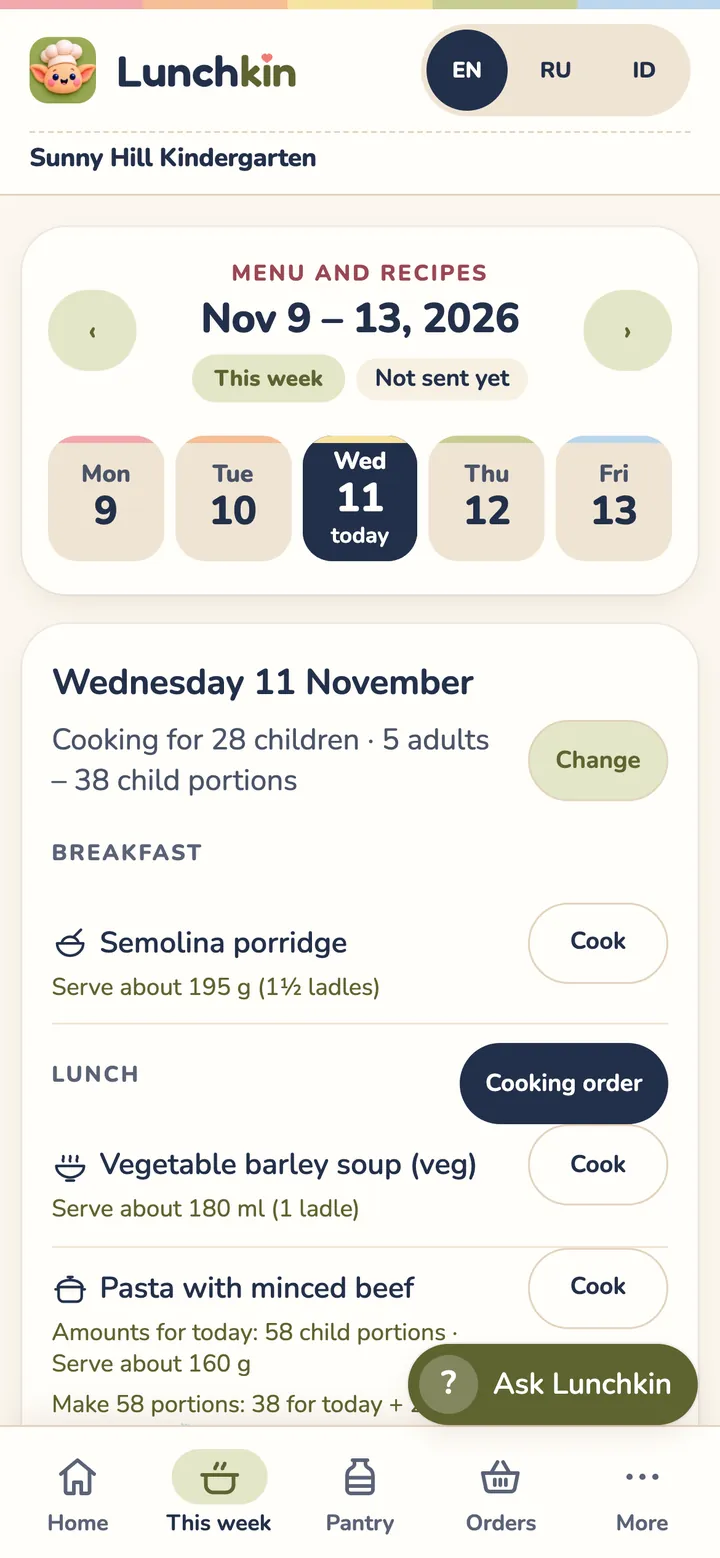
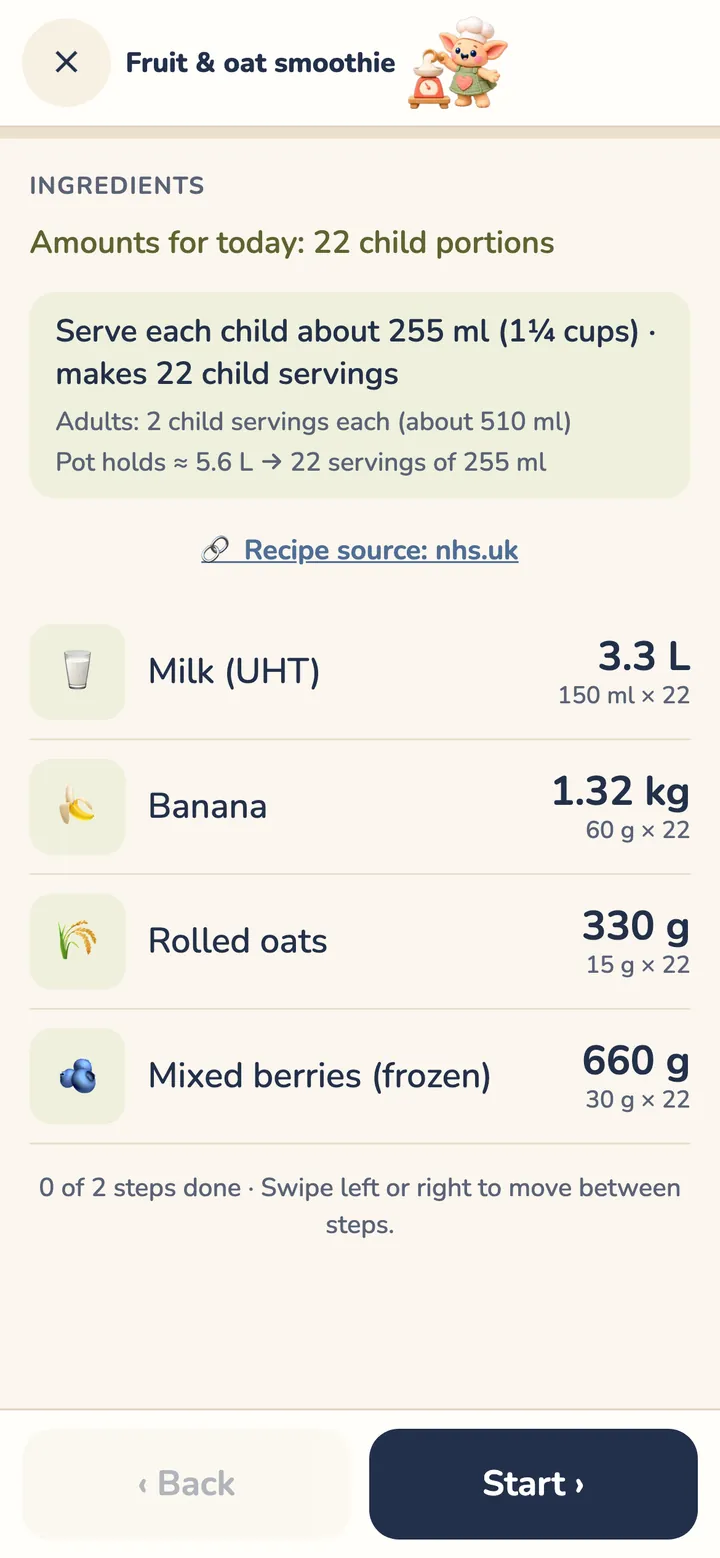
Cooks open today's menu on their phone, in their language. Each recipe is scaled to today's headcount, plus any portions for the freezer: ingredients, then one step per screen, with a timer. It works offline; cooks can't change prices or suppliers.
Leave your details and we'll email you the demo video. Questions? Reply to that email and we'll answer.
Owner and cook alike: every screen, every dish and every recipe shows in the language each person picks. The owner can plan in one language while the cook reads the same menu in their own.
The chat on this website answers in English, Russian and Indonesian.

Pasta with minced beef
1. Boil the pasta in plenty of salted water until tender, then drain it.
Макароны по-флотски
1. Макароны отварить в подсоленной воде до мягкости и откинуть на дуршлаг.
Pasta daging cincang
1. Rebus pasta dalam air bergaram sampai empuk, lalu tiriskan.
The same lunch, as each person sees it
Lunchkin fills your weeks with balanced, varied menus. Swap any dish you like.
Each supplier gets its own list – what the menu needs, minus what's on the shelf – ready for WhatsApp.
Your cook opens today's menu on the phone: amounts for today's headcount, step by step.
This is what a normal week looks like once your kitchen is set up.
Fill the open weeks with "Plan the month", or use a past menu again. Set the week's headcount – children and adults.
Every day is scored on 9 nutrients – green, amber or red, with a plain message. "Balance day" fixes a gap in one tap.
Each supplier gets its own order: fresh food every week, dry goods once a month. One tap opens it in WhatsApp, ready to check and send.
Deliveries go into the pantry. If the shelf and the screen disagree, a quick recount puts it right.
Each day the cook opens today's menu: amounts for today's headcount, one big step at a time, with a timer.
See what food cost per child, keep the week as a past menu, and check which weeks are planned or cooked.
Changes are saved on the device and sync when you're back online. Installs on any phone.
Admins and cooks each have their own. Cooks can't change prices or suppliers.
Children are a headcount only. No personal data of children or parents is stored.
Halal / no pork, vegetarian, and common allergens tagged on every dish.
Breakfast, lunch, snack and dinner for 28 children and 5 adults – every dish from the app's own library, and none of them twice in the week.
Every day's nutrition checked, food cost per child in view, and a kitchen that doesn't depend on one person.
Orders written from the menu, a pantry that keeps itself up to date, and less typing.
What to cook today and how much – on the phone, in their own language.


Lunchkin suits your kitchen if most of these are true:
Older children, up to 15? We can tailor the meal planning to your school – age groups, portions and targets – as an add-on. Ask us.


The full app, set up for your kitchen
or $600 per year (2 months free)
$60 per kitchen per month, or $600 per year (2 months free)
We set it up: menu, suppliers, prices, logins, training, first-week check
Lunchkin with your school's logo and colours
Quoted for each school.
Your own app – your name, your icon, your web address
Quoted for each school.


New features, a new menu library or a new location are agreed and priced with you first.

Ask the chat on this page, or email us at hello@lunchkin.app.
$60 per kitchen per month, or $600 per year (2 months free), plus a one-time $250 setup. Lunchkin in your colours and Your own app are quoted for each school – talk to us.
We set everything up for you: we load your menu (your own dishes plus the starter library), add your suppliers and prices, create a login for each person, switch off the parts your kitchen doesn't use, train your team, and check in after your first week.
Today each supplier's order is ready in one tap and opens in WhatsApp with the text written – you check it and press send; the app never sends anything by itself. If your suppliers take orders by Telegram, email or their own online ordering, we can set that up when we set up your kitchen. It's quoted for your kitchen, so tell us how your suppliers work.
Prices are in US dollars. Ask us how to pay.
Food costs in the app use one currency today. A per-school currency is on our list, so tell us yours.
English, Russian and Indonesian – every screen, dish and recipe – and more on request. Each person picks their own, owner and cook alike. The chat on this website answers in English, Russian and Indonesian.
It depends on your menu and suppliers. We agree a start week with you, and check in after the first week – ask us.
Not yet. Every school is set up by us, so you start with your own menu, suppliers and logins ready. Email us at hello@lunchkin.app to begin.
Any phone, tablet or laptop with a modern browser. It installs on the home screen like an app, on Android and iPhone.
Yes. Changes are saved on the device and sync when you are back online.
Yes, on Lunchkin in your colours – your logo and colours in the app and on printouts. Your own app goes further: your own name, icon and web address. Both are quoted for each school. If you don't have a logo yet, we can help with that too.
More questions
Every day is checked on 9 nutrients against daily reference intakes for the child's age group – ages 1–3, 4–6 and 7–9. It is a planning aid – as accurate as the recipes and portions in it, and not reviewed by a nutritionist. Your school follows a particular national standard? Tell us at setup and we'll say honestly whether we support it yet.
Today Lunchkin plans four meals a day – breakfast, lunch, snack and dinner – Monday to Friday. Lunch-only kitchens and other meal patterns are not a good fit yet. Tell us how your kitchen works and we'll be honest about it.
It is best for kitchens feeding children aged 1–9. For older children, up to 15, we set up age groups, portions and targets for your school as an add-on – ask us.
Yes. We load your own dishes at setup, next to a starter library of more than 140 home-style dishes – soups, porridges, mains, sides, snacks and vegetarian dishes.
Cuisine packs are planned. We can also build a dish library in the cuisine your children eat, as an add-on – ask us.
Email us at hello@lunchkin.app. Questions, bug fixes and updates are covered on every plan; updates arrive by themselves, keep your data and are tested automatically before they reach your kitchen. New features, a new menu library or a new location are agreed and priced with you first.
Tell us about your kitchen – we'll tell you honestly if Lunchkin fits.


Write it here and we'll answer by email.
We couldn't send the form just now, so we've written it as an email for you.
Your email app should open with your question filled in. Press send and we'll answer there.